Claude教程02-Memory
香蕉
参考文档:https://code.claude.com/docs/en/memory 参考文档:https://code.claude.com/docs/en/commands
/init
官方解释:Initialize a new CLAUDE.md file with codebase documentation
个人理解:感觉官方解释是真的晦涩难懂,说直白点。/init就是让Claude先把这个项目摸一遍,然后写成一个备忘录。 以后你每次这个项目,它会先看这个备忘录,不用你每次从「这个项目是什么,怎么跑」开始讲起。
我用一个没有init过的项目举例子:
你先打开一个cd进去你的项目,然后Claude,别跟他说"帮我init",你直接
/init
然后等Claude跑完,我的Claude给我的回复是这样的
Created `CLAUDE.md`, mengyang. It covers: the Blume CLI commands, how content in `docs/` maps to the generated `.blume/` Astro project, this repo's role as a design reference for the `my-blog` restyle work, and where to find Blume's bundled full docs/skills for anything beyond the basics.
总结:当你输入/init时候,Claude会做大概这些:
- Creates a new CLAUDE.md file in your project
- Establishes project conventions and guidelines
- Sets up the foundation for context persistence across sessions
另外Claude官方也说是建议第一次进入项目就/init。

那么有个问题了,如果项目一个代码都没,就是一个空文件夹呢?
那你先把目标说清楚,让 Claude 开工。然后等仓库里有了骨架再 init 或手写备忘录。
/memory
官方解释: Edit CLAUDE.md files and memory settings
个人理解:跟官方一致。
当你输入/memory时候,会出来三个选项,长这样:
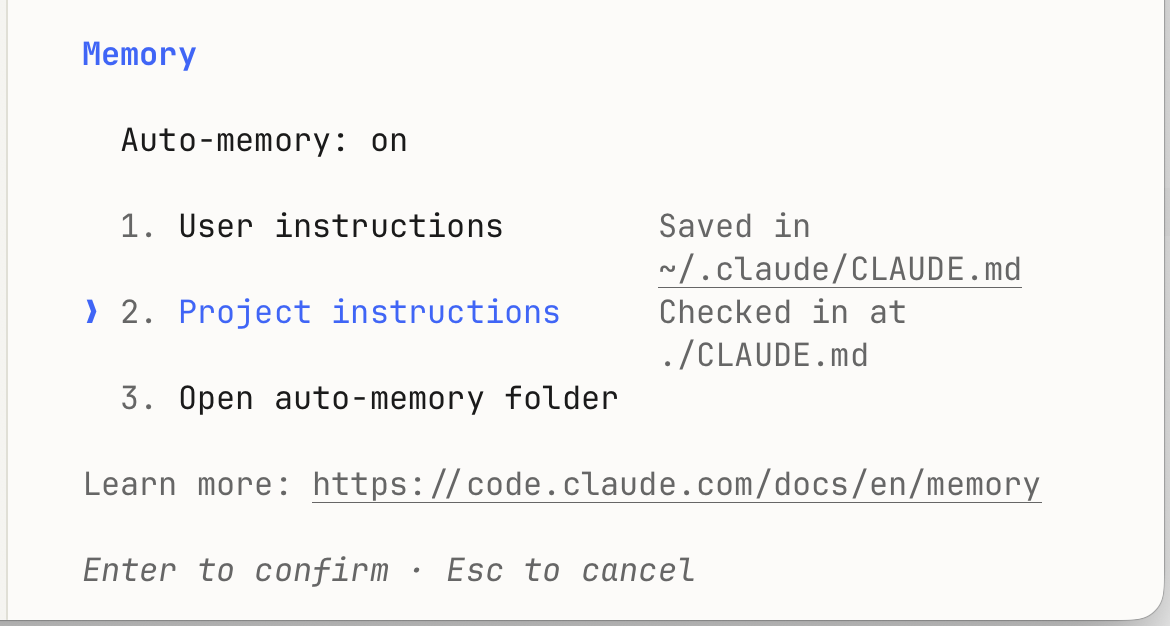
- User instructions,全局生效。你想想什么东西你想让他每个对话都生效?我写的是:每次都叫我mengyang.所以,他每次都叫我mengyang,如果没叫我mengyang,那就说明没看
CLAUDE.md。
没看
CLAUDE.md说明Claude可能降智。(在中国很常见)
- Project instructions,只是当前项目生效,记得刚开始用的
/init吗?当你/memory,选项二,enter,用默认editor打开的这个文件就是刚才/init写的文件。 我个人很少碰。 - Auto-memory folder:就是你在和Claude聊天时Claude自动记忆的。